

Email Tracker for Gmail Real-Time Email Tracking
Email Tracker for Gmail lets you track email opens, monitor link clicks, measure engagement, and manage signature requests—all from one powerful, easy-to-use workspace.




Designed for fast-moving teams that rely on email
See every important email signal in one calm, focused workspace
Watch how Mailtrackio turns opens, clicks, activity, and document progress into simple actions your team can use immediately.
Everything You Need in an Email Tracker for Gmail
Each feature is designed to remove guesswork, surface intent, and help you choose the next action with confidence.
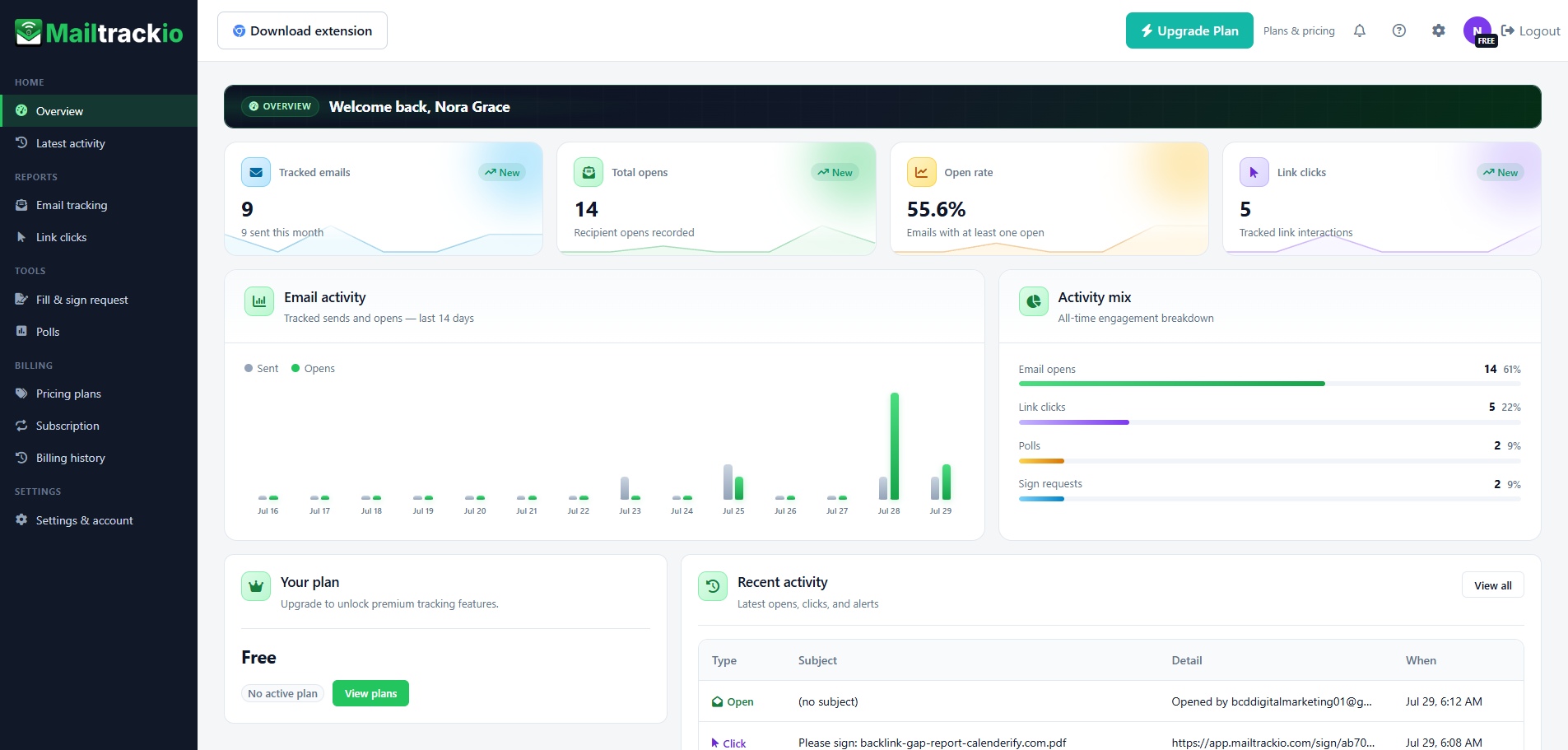
Start every day with a clear view of your email performance
See tracked emails, total opens, open rate, link clicks, recent activity, and plan details in a single dashboard that keeps the most useful information visible.
- Review core engagement metrics without building a report.
- Compare email activity and engagement mix at a glance.
- Jump directly into recent opens, clicks, and alerts.
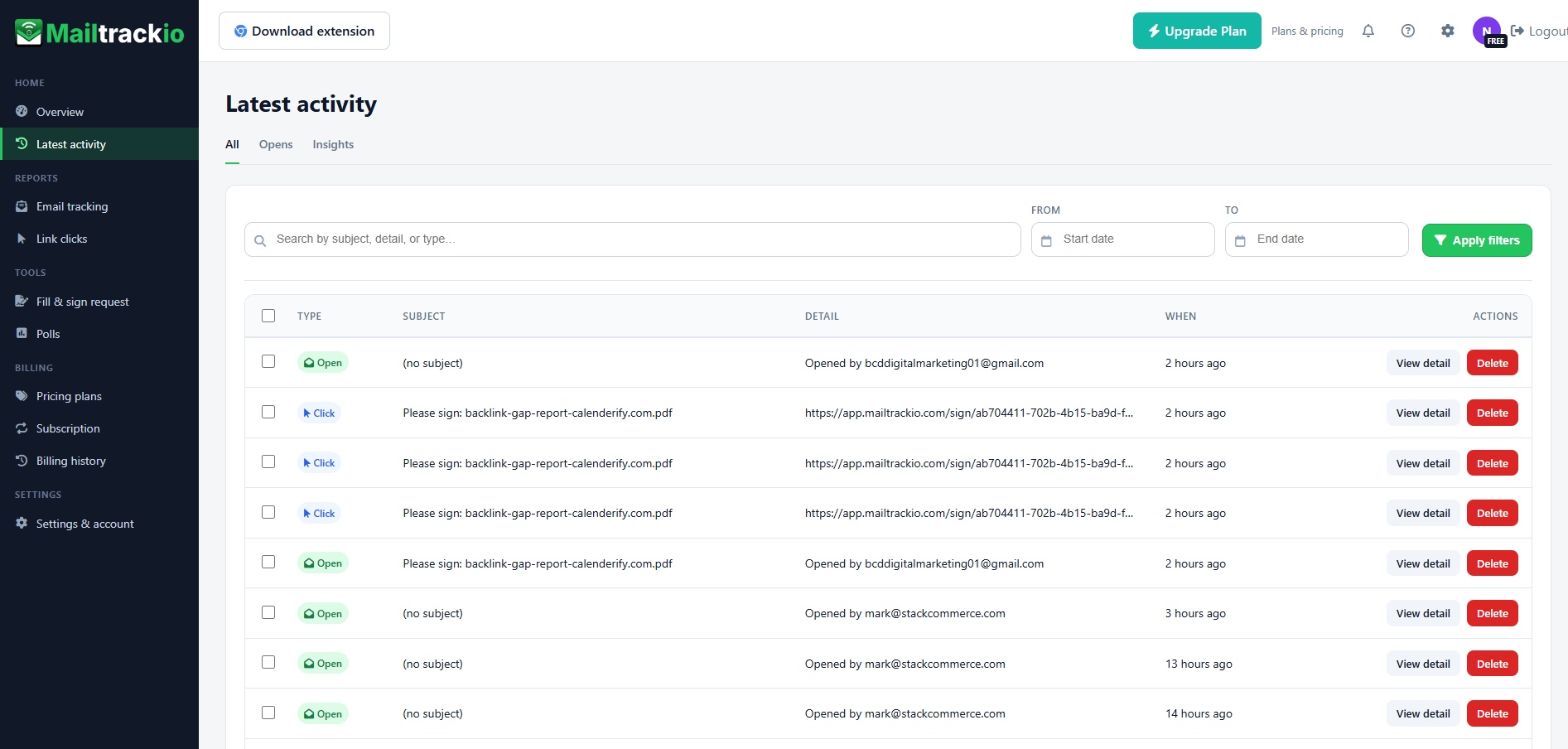
Follow every open, click, and alert in a searchable timeline
Use the activity stream to understand who engaged, what happened, and when it happened. Search by subject or detail, filter by date, and open individual records when you need more context.
- Search engagement events by subject, detail, or type.
- Filter activity by date range to review a campaign period.
- Separate opens and insights for faster analysis.
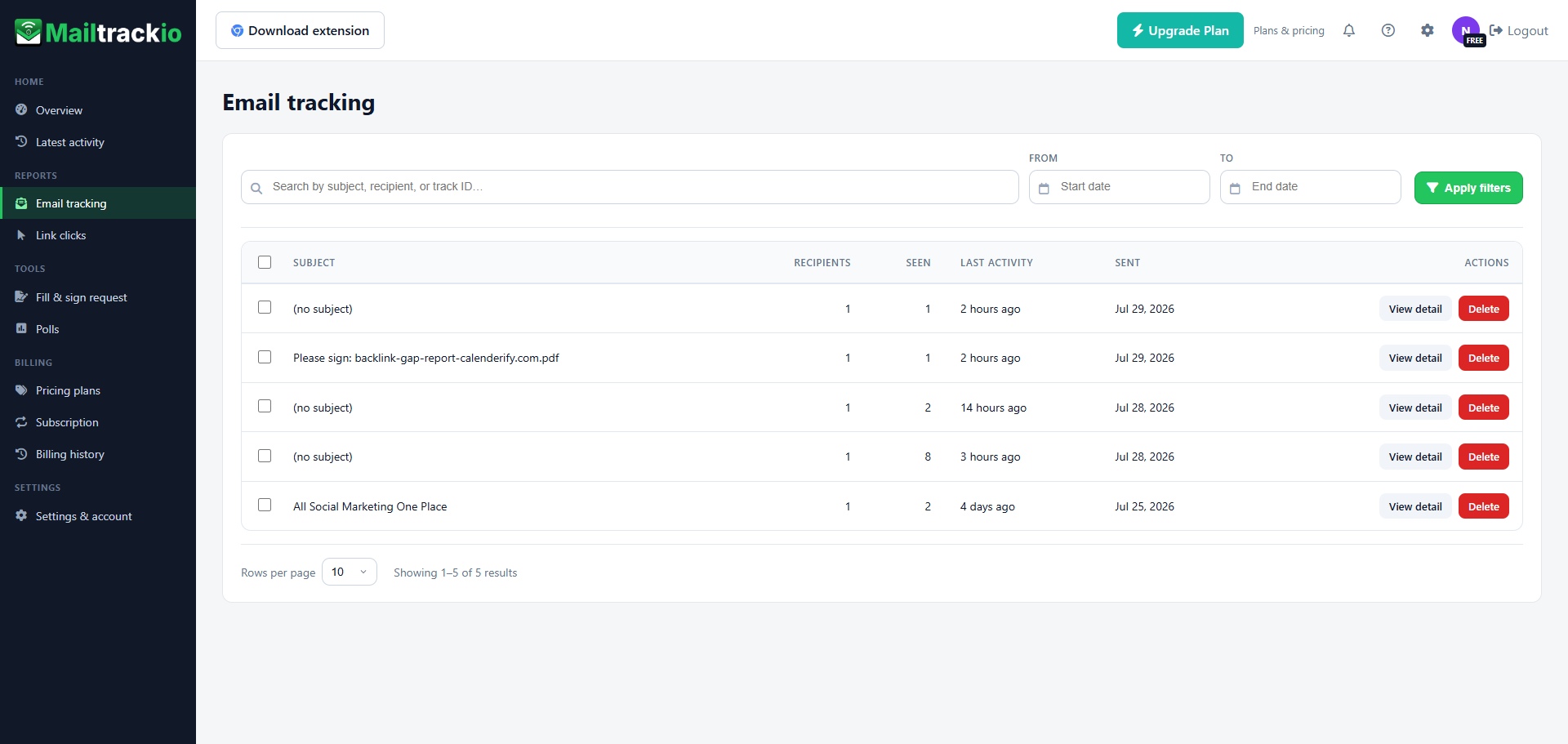
Know which emails are being seen and where attention is building
Review each tracked message by subject, recipient count, views, last activity, and send date. Open a detailed record when you need to understand a specific conversation.
- See recipient and view information for every tracked email.
- Sort attention by last activity instead of guessing.
- Search by subject, recipient, or tracking ID.
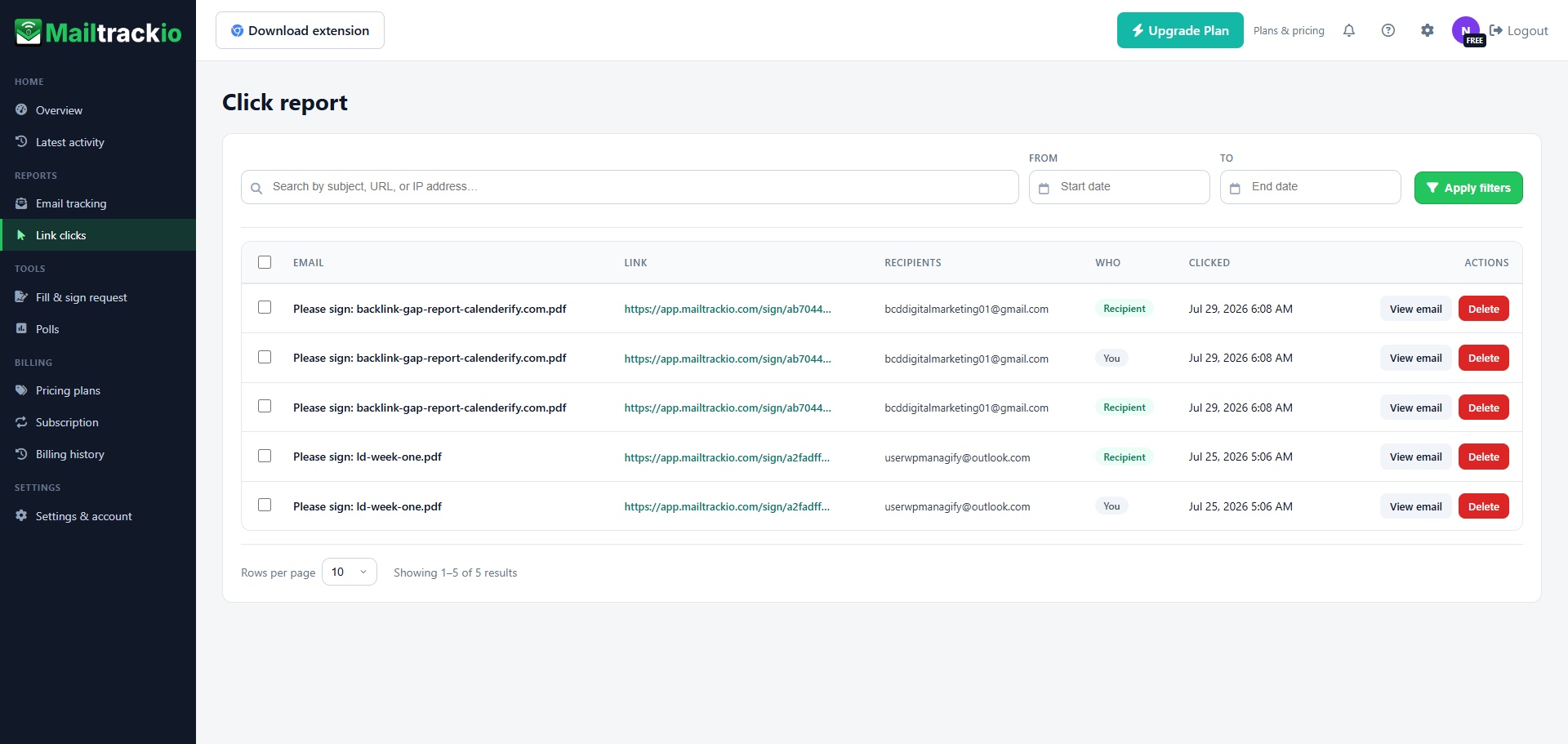
See which links attract attention after the email is opened
Understand which recipient clicked, which link they used, and when the action happened. Click reporting helps distinguish casual opens from stronger interest in your offer, document, or next step.
- Review the destination link connected to each click.
- Identify whether the recipient or sender generated the event.
- Search by subject, URL, or IP address when needed.
Keep document requests and signing progress beside your email activity
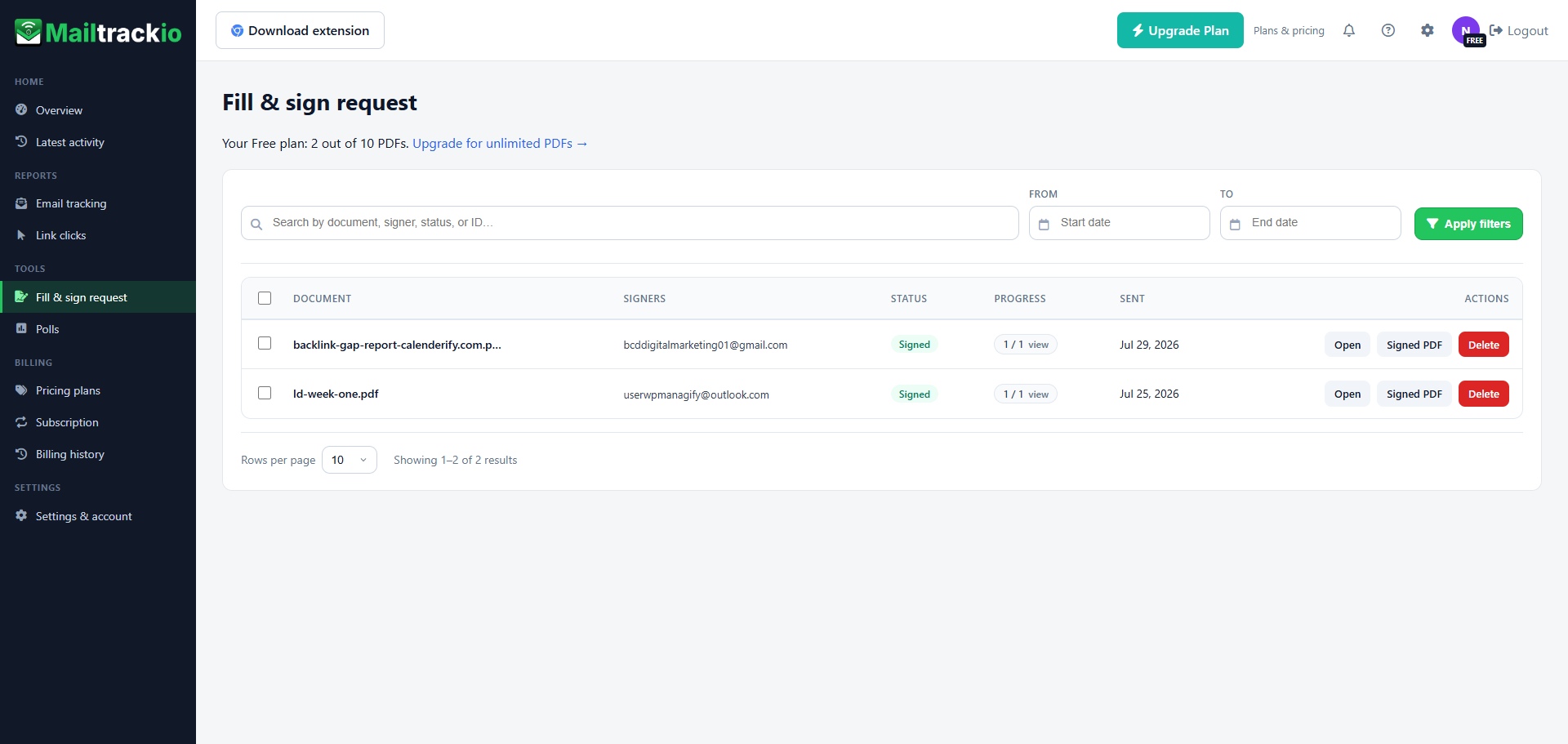
Send a document for signature, see who needs to sign, check the current status, review progress, and open the signed PDF from the same workspace.
- Track pending and completed signature requests.
- View signer details and completion progress.
- Access the signed PDF directly from the request list.
Turn silence into useful context not assumptions
A sent email rarely tells you what to do next. Engagement signals add context, helping you decide when to follow up, which conversations deserve attention, and where an opportunity may be slowing down.
Follow up at a better time
Use recent opens and clicks as a timing signal so your next message feels relevant instead of random.
Prioritize warmer conversations
Focus first on contacts who are actively reviewing your email, proposal, document, or shared link.
Improve your outreach message
Compare engagement patterns to learn which subject lines, calls to action, and links attract attention.
Keep momentum visible
See whether an important conversation is moving forward, waiting for action, or ready for a different approach.
Built for anyone whose next move depends on an email response
Mailtrackio gives individuals and teams the engagement context they need without turning email into another complex analytics project.
Sales professionals
Track prospect interest, identify warmer leads, and time follow-ups around real engagement.
Better conversation timingRecruiters
See when candidates review outreach, interview details, job descriptions, or next-step documents.
Clearer candidate intentFreelancers
Know when clients open proposals, click portfolio links, and return to important project emails.
More confident follow-upsCustomer success teams
Confirm whether customers have seen onboarding steps, support guidance, or renewal information.
More proactive assistanceAgencies
Track client reviews, campaign links, creative approvals, and document progress across active accounts.
Smoother client workflowsFounders and operators
Stay close to investor, partner, vendor, and customer conversations without manually checking every thread.
Faster priority decisionsUseful intelligence without the clutter of enterprise software
Mailtrackio focuses on the signals that help you act, presented in a clean interface your team can understand from the first session, making it the ideal Email Tracker for Gmail.
Fast visibility
See opens, clicks, and activity without digging through long email threads or separate reports.
Focused interface
A calm dashboard keeps essential metrics visible and supporting details one click away.
Powerful search
Find activity by subject, recipient, link, detail, tracking ID, IP address, or date range.
Link-level insight
Move beyond opens and see which shared pages, proposals, or resources receive clicks.
Document workflow
Manage signature requests and signed PDFs alongside the engagement that led to them.
Useful filtering
Narrow reports quickly so your team can answer a specific question without exporting data.
Account control
Keep settings, subscription details, billing history, and account options in one place.
Simple adoption
A familiar SaaS experience helps individuals and teams get value without long training.
Working without tracking
More guesswork- Follow-ups rely on assumptions.
- Warm conversations are easy to miss.
- Click intent remains invisible.
- Document progress lives elsewhere.
Working with Mailtrackio
Clearer next steps- Follow-up timing uses engagement context.
- Active contacts rise to the top.
- Link interest is visible in the report.
- Signature progress stays connected.
The kind of clarity email driven teams look for
Present real customer feedback in a polished review wall that feels personal, credible, and easy to scan.
“The dashboard gives me the answer I need in seconds: who opened, who clicked, and who deserves a follow-up today.”
 Olivia Bennett
Sales Operations · Demo profile
Olivia Bennett
Sales Operations · Demo profile
“Click reporting helps us separate a polite open from real interest. That makes our outreach queue much easier to prioritize.”
 Ethan Carter
Agency Director · Demo profile
Ethan Carter
Agency Director · Demo profile
“I can send a proposal, check engagement, and keep the signature request visible without building a separate tracking system.”
 Sophia Turner
Independent Consultant · Demo profile
Sophia Turner
Independent Consultant · Demo profile
“The activity timeline is clean enough for daily use. I do not need a spreadsheet just to understand candidate engagement.”
 Liam Harris
Talent Partner · Demo profile
Liam Harris
Talent Partner · Demo profile
“The filters are straightforward. I can review a date range, find the right event, and move on without exporting anything.”
 Maya Collins
Customer Success Lead · Demo profile
Maya Collins
Customer Success Lead · Demo profile
“For founder outreach, knowing that a partner returned to the email is often enough context to send the next message.”
 Noah Mitchell
Startup Founder · Demo profile
Noah Mitchell
Startup Founder · Demo profile
“Our team likes that the important information is visible immediately. The interface does not get in the way of the work.”
 Amelia Brooks
Revenue Team Manager · Demo profile
Amelia Brooks
Revenue Team Manager · Demo profile
“The signature request screen keeps document status easy to understand. It fits naturally beside our email follow-up process.”
 James Foster
Client Services · Demo profile
James Foster
Client Services · Demo profile
Clear answers before you start tracking
Learn how Mailtrackio fits into your daily email workflow, what you can monitor, and where to go when you need help.
Email Tracker for Gmail with Instant Open Alerts
Email Tracker for Gmail helps you track opens, clicks, and document progress in one dashboard for smarter, more effective follow-ups.