

Choose an AI assistant to open this article URL with a summary request. Review generated summaries against the original article.
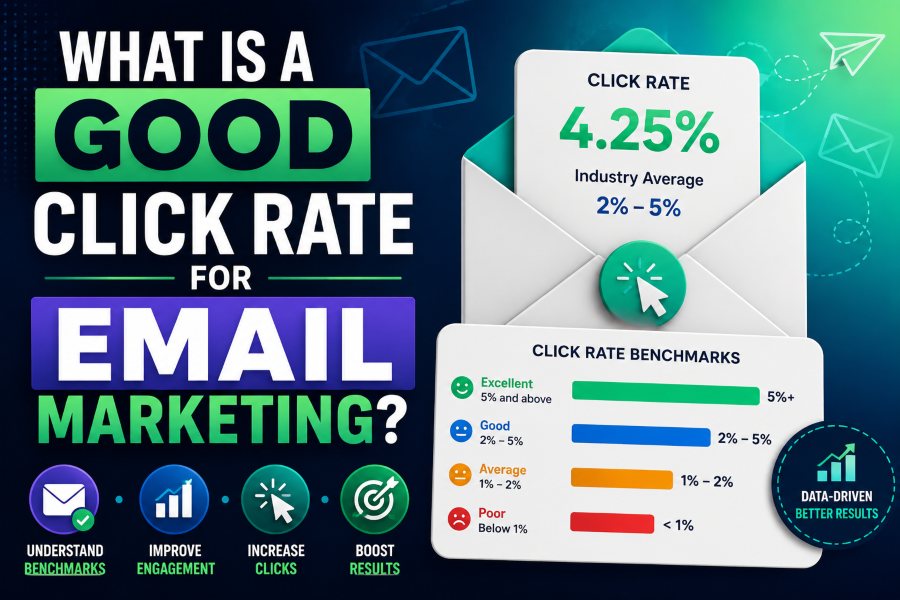
| QUICK ANSWER: A 2%-5% email click rate is often considered a useful broad reference range, but a good result is one that beats your comparable baseline and produces profitable or meaningful conversions. Judge click rate by industry, audience, message type, offer, and list quality, and always review revenue, conversions, unsubscribes, and complaints alongside it. |
The Short Answer: Use 2%-5% as Context, Not a Universal Target
Mailchimp notes that click rates between 2% and 5% are often seen as successful, while also emphasizing that results differ by industry. That makes the range a starting reference, not a promise or pass-fail rule. A targeted onboarding message can reasonably outperform a broad newsletter, and a high-value B2B campaign may create excellent pipeline from a lower click rate.
The most useful answer to what is a good click rate for email marketing is therefore comparative: good means the campaign performs well against the same type of message, sent to a similar audience, under similar conditions, while protecting conversions and audience health. A 3% click rate that produces qualified buyers can be better than an 8% rate driven by curiosity clicks that do not convert.
How to Calculate Email Click Rate
Click rate is usually calculated as unique recipients who clicked at least one tracked link divided by delivered emails, multiplied by 100. If 10,000 messages are delivered and 300 recipients click, the click rate is 3%. Unique clickers prevent one enthusiastic recipient from inflating the audience-level rate by clicking many times.
| FORMULA: Email click rate = unique recipients who clicked / delivered emails x 100 |
Confirm the definition used by your platform. Some dashboards report total clicks, unique clicks, click-through rate, or clicks per unique open using similar labels. The denominator may be sent, delivered, or opened messages. A number is not comparable until the numerator and denominator match.
Click Rate vs. Click-to-Open Rate
Click-to-open rate, or CTOR, divides unique clickers by unique tracked openers. It attempts to answer how persuasive the content was among people recorded as opening. Click rate evaluates more of the full email journey because delivered messages are the denominator.
CTOR can be useful within one platform and similar audiences, but its denominator is less stable than it once was. Apple’s Mail Privacy Protection hides IP addresses and prevents senders from reliably learning whether protected recipients opened a message. Other image proxies, prefetching, and security scanners can also distort opens. For that reason, click rate is often the clearer engagement metric, while conversions are closer to business value.
Why Click Rate Benchmarks Vary
Industry and buying behavior
Different industries have different purchase cycles, content expectations, and levels of urgency. A daily publisher, a nonprofit appeal, a software trial, and a luxury purchase should not share one target. Compare your results with a relevant industry benchmark where available, then prioritize your own historical baseline.
Campaign type
Triggered emails often arrive at a moment of active intent and can outperform scheduled broadcasts. Welcome, password, cart, onboarding, and renewal messages have different jobs. A newsletter may include several educational paths, while a promotion may focus on one offer. Group performance by campaign purpose before averaging it.
Audience quality and lifecycle stage
Recent subscribers and active customers usually behave differently from old leads or unengaged contacts. Acquisition source matters too. People who requested a detailed guide may click educational links, while buyers who opted in at checkout may respond to product updates. A blended list average can hide strong and weak segments.
Offer strength and message relevance
Clicks reflect the relationship between promise and action. A clear, relevant offer with specific value creates a stronger reason to click. Vague copy, too many competing links, weak proof, or a mismatch between subject line and body can reduce action even when the design looks polished.
Deliverability and rendering
Recipients cannot click an email they never receive or cannot read. Authentication, sender reputation, complaint levels, mobile layout, image blocking, dark mode, broken links, and accessibility all affect the measured rate. Google’s sender guidance recommends monitoring server responses, spam rate, and domain reputation as volume grows.
Set a Click-Rate Target That Fits Your Business
- Group campaigns by purpose, such as newsletter, promotion, onboarding, renewal, or re-engagement.
- Calculate a recent median for each group; a median is less distorted by one unusually high or low campaign.
- Segment the baseline by meaningful audience differences where volume supports it.
- Review a relevant external benchmark as context, not as the only goal.
- Set a realistic improvement target and pair it with conversion and audience-health guardrails.
- Recalculate the baseline after major list, product, or measurement changes.
For example, if the median click rate for your last eight customer newsletters is 2.4%, a goal of 2.7% may be meaningful. But the test is only a success if conversions remain useful and unsubscribes or complaints do not worsen. If a redesign lifts clicks to 3.1% while reducing purchases, investigate whether the new CTA attracts the wrong intent.
How to Diagnose a Low Click Rate
Delivery is weak
If delivered volume falls or spam placement rises, start with list hygiene, authentication, reputation, complaint sources, and sending patterns. Creative changes cannot repair a campaign that does not reach the inbox.
Opens are stable but clicks fall
The sender and subject may still earn attention, while the message fails after the open. Review the opening promise, relevance, copy length, CTA visibility, offer, proof, and mobile experience. Confirm that automated scanners are not responsible for an earlier inflated baseline.
Clicks are healthy but conversions fall
The email may be doing its job while the landing page fails. Check message-to-page alignment, load speed, form length, mobile usability, price, inventory, trust signals, and checkout errors. Also verify analytics tags and attribution before rewriting the campaign.
One segment performs poorly
A segment-level decline can indicate stale interests, poor acquisition quality, wrong lifecycle timing, or fatigue. Tailor the content, reduce frequency, ask for preferences, or create a re-engagement path instead of changing the message for everyone.
Worked Click-Rate Examples
Example 1: a smaller campaign with qualified action
A company delivers 2,000 onboarding emails and 90 recipients click. The unique click rate is 4.5%. If 27 of those recipients complete setup, the post-click conversion rate is 30% and the delivered-email conversion rate is 1.35%. The campaign sits near the top of the broad 2%-5% click reference and produces a meaningful product outcome.
Example 2: high clicks with weak intent
A promotion delivers 20,000 emails and generates 1,200 unique clickers, a 6% click rate. Only 24 people purchase, so post-click conversion is 2%. The subject or CTA may create curiosity without setting the right expectation, or the landing page may introduce friction. Calling the campaign successful based only on 6% would miss the conversion problem.
Example 3: a bot-inflated report
A B2B campaign suddenly reports a 12% click rate within minutes of sending, with nearly every link clicked in the same order. That pattern can indicate automated security scanning rather than human engagement. Filter known bot activity where the platform supports it, compare timestamps and downstream sessions, and avoid triggering sales follow-up solely from the raw click event.
These examples show why a click-rate target needs companion metrics. Pair it with conversions, revenue or pipeline, post-click behavior, and complaint or unsubscribe guardrails. The goal is not the largest percentage; it is more useful action from the right recipients.
Nine Ways to Improve Email Click Rate
1. Strengthen the message-to-audience match
Use behavior, lifecycle stage, interests, or customer status to send a more relevant promise. Good segmentation is not personalization theater; it changes the problem, proof, offer, or next step.
2. Make one action dominant
Give the email one primary CTA and make it visually and verbally clear. Secondary links can support the message, but they should not compete equally for attention.
3. Put value before the button
Explain what the recipient gains and why the action matters now. A button cannot rescue an unclear offer. Specific benefits, credible proof, and reduced uncertainty improve qualified clicks.
4. Use descriptive CTA copy
Replace generic phrases with actions that set an expectation: View the benchmark report, Start the free assessment, Compare plans, or Reserve my place. The landing page must deliver exactly what the CTA promises.
5. Design for mobile and accessibility
Use readable text, adequate contrast, tappable buttons, short paragraphs, and a layout that works without images. Descriptive link text is more accessible and persuasive than repeated click here labels.
6. Reduce unnecessary choices
A crowded navigation bar, social icons, multiple products, and several offers can scatter attention. Remove links that do not serve the campaign objective and prioritize the most valuable next step.
7. Improve the subject-body connection
The subject line earns the open, but the body must immediately continue the same promise. A curiosity subject that leads to unrelated content may create opens without clicks and damage trust.
8. Test the offer, not only the color
Button-color tests rarely matter as much as the value proposition, incentive, proof, CTA language, or audience. Form a hypothesis, test one major variable, and measure conversions as well as clicks.
9. Clean and re-engage the list
Inactive subscribers dilute click rate and can weaken reputation. Run a respectful re-engagement sequence, let people choose preferences, and suppress contacts who no longer want or respond to the content.
Avoid Click-Rate Measurement Traps
- Do not compare total clicks in one report with unique clickers in another.
- Do not compare a small, high-intent segment with a broad promotional list.
- Do not call bot or security-scanner clicks human engagement.
- Do not optimize a misleading CTA that creates clicks but damages conversions or trust.
- Do not ignore delivery changes, broken links, or analytics-tagging errors.
- Do not declare a test winner before the planned sample and conversion window are complete.
How Mailtrackio Fits Into Click Analysis
Mailtrackio gives Gmail users open tracking, live alerts, and a dashboard that supports timely follow-up. In one-to-one sales, recruiting, proposal, and client communication, an open event can help prioritize the next action. Combine it with link clicks, replies, meetings, and CRM outcomes. Privacy tools and automated loading mean an open remains a directional signal, not proof that a recipient read or agreed with the message.
Frequently Asked Questions
Is a 2% email click rate good?
It can be. A 2% rate sits at the lower end of a commonly cited 2%-5% range, but quality depends on industry, audience, campaign type, historical baseline, and conversions.
Is a 5% click rate good?
A 5% unique click rate is strong for many campaigns. Confirm that the calculation uses delivered emails, exclude obvious bot activity where possible, and check whether the clicks produce the intended outcome.
What is more important: open rate or click rate?
Click rate is usually closer to meaningful engagement because it records an action. Open rate remains useful for directional diagnosis, but privacy protection and image loading make it less reliable on its own.
Should I compare my click rate with competitors?
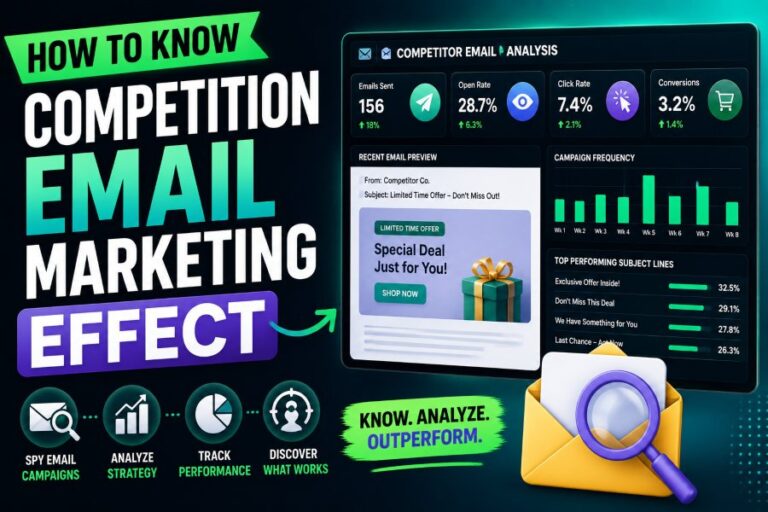
Use credible industry or peer benchmarks for context, but prioritize your own comparable history. Competitors’ exact private performance is rarely visible, and their audience, offer, and measurement definitions may differ.
Put the Insights Into Action
Use Mailtrackio to add Gmail open tracking, live alerts, and practical follow-up visibility to the messages where timing matters. Visit Mailtrackio and combine engagement signals with replies, clicks, conversions, and respectful communication.

Comments
0 responsesNo comments yet. Be the first to share your thoughts.